CupertinoRadio
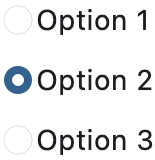
A macOS-styled radio button, allowing the user to select a single option from two or more choices.
ft.RadioGroup(
    value="option_2",
    content=ft.Column(
        intrinsic_width=True,
        controls=[
            ft.CupertinoRadio(value="option_1", label="Option 1"),
            ft.CupertinoRadio(value="option_2", label="Option 2"),
            ft.CupertinoRadio(value="option_3", label="Option 3"),
        ],
    ),
)
Inherits: LayoutControl
Properties
active_color- The color used to fill this radio when it is selected.autofocus- Whether this radio will be selected as the initial focus.fill_color- The color that fills this radio.focus_color- The color for the radio's border when it has the input focus.inactive_color- The color used to fill this radio when it is not selected.label- The clickable label to display on the right of this radio.label_position- The position of the label relative to this radio.mouse_cursor- The cursor for a mouse pointer when it enters or is hovering over this radio.toggleable- Whether this radio button can return to an indeterminate state by selecting it again when already selected.use_checkmark_style- Whether the radio displays in a checkbox style instead of the default radio style.value- The value to set to RadioGroup ancestor/parent when this radio is selected.
Events
Examples
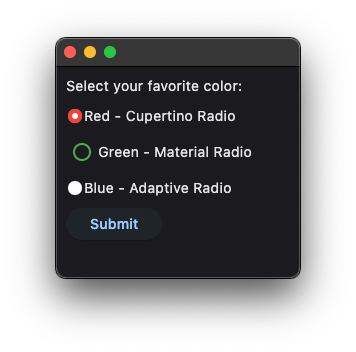
Cupertino, Material and Adaptive Radios
import flet as ft


def main(page: ft.Page):
    message = ft.Text()

    group = ft.RadioGroup(
        content=ft.Column(
            controls=[
                ft.CupertinoRadio(
                    value="red",
                    label="Red - Cupertino Radio",
                    active_color=ft.Colors.RED,
                    inactive_color=ft.Colors.RED,
                ),
                ft.Radio(
                    value="green",
                    label="Green - Material Radio",
                    fill_color=ft.Colors.GREEN,
                ),
                ft.Radio(
                    value="blue",
                    label="Blue - Adaptive Radio",
                    adaptive=True,
                    active_color=ft.Colors.BLUE,
                ),
            ],
        )
    )

    def handle_button_click(_: ft.Event[ft.Button]):
        message.value = f"Your favorite color is: {group.value}"

    page.add(
        ft.SafeArea(
            content=ft.Column(
                controls=[
                    ft.Text("Select your favorite color:"),
                    group,
                    ft.Button(content="Submit", on_click=handle_button_click),
                    message,
                ],
            ),
        )
    )


if __name__ == "__main__":
    ft.run(main)
Properties
active_colorclass-attributeinstance-attribute
active_color: Optional[ColorValue] = Colors.PRIMARYThe color used to fill this radio when it is selected.
autofocusclass-attributeinstance-attribute
autofocus: bool = FalseWhether this radio will be selected as the initial focus.
If there is more than one control on a page with autofocus set, then the first one added to the page will get focus.
fill_colorclass-attributeinstance-attribute
fill_color: Optional[ColorValue] = NoneThe color that fills this radio.
focus_colorclass-attributeinstance-attribute
focus_color: Optional[ColorValue] = NoneThe color for the radio's border when it has the input focus.
inactive_colorclass-attributeinstance-attribute
inactive_color: Optional[ColorValue] = NoneThe color used to fill this radio when it is not selected.
labelclass-attributeinstance-attribute
label: Optional[str] = NoneThe clickable label to display on the right of this radio.
label_positionclass-attributeinstance-attribute
label_position: LabelPosition = LabelPosition.RIGHTThe position of the label relative to this radio.
mouse_cursorclass-attributeinstance-attribute
mouse_cursor: Optional[MouseCursor] = NoneThe cursor for a mouse pointer when it enters or is hovering over this radio.
toggleableclass-attributeinstance-attribute
toggleable: bool = FalseWhether this radio button can return to an indeterminate state by selecting it again when already selected.
use_checkmark_styleclass-attributeinstance-attribute
use_checkmark_style: bool = FalseWhether the radio displays in a checkbox style instead of the default radio style.
valueclass-attributeinstance-attribute
value: str = ''The value to set to RadioGroup ancestor/parent when this radio is selected.
Events
on_blurclass-attributeinstance-attribute
on_blur: Optional[ControlEventHandler[CupertinoRadio]] = NoneCalled when this radio has lost focus.
on_focusclass-attributeinstance-attribute
on_focus: Optional[ControlEventHandler[CupertinoRadio]] = NoneCalled when this radio has received focus.