CupertinoTimerPicker
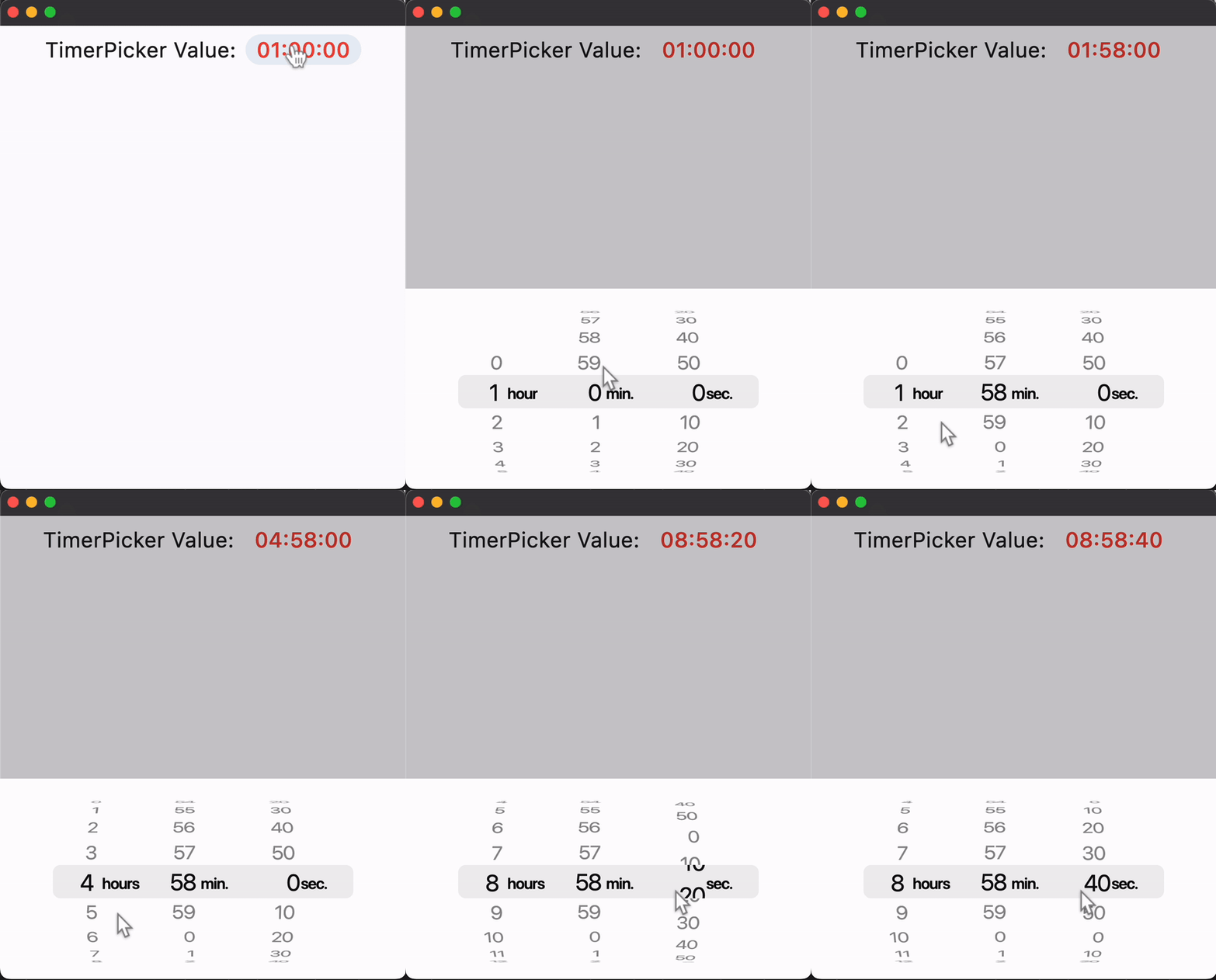
A countdown timer picker in iOS style.
It can show a countdown duration with hour, minute and second spinners. The
duration is bound between 0 and 23 hours 59 minutes 59 seconds.
Example:
ft.CupertinoTimerPicker(value=1000)

Inherits: LayoutControl
Properties
alignment- Defines how this picker should be positioned within its parent.bgcolor- The background color of this picker.item_extent- The uniform height of all children.minute_interval- The granularity of the minute spinner.mode- The mode of this picker.second_interval- The granularity of the second spinner.value- The initial duration of the countdown timer.
Events
on_change- Called when the timer's duration changes.
Examples
Basic Example
import time

import flet as ft


def main(page: ft.Page):
    page.horizontal_alignment = ft.CrossAxisAlignment.CENTER

    timer_value_text = ft.Text(
        value="00:01:10",
        size=23,
        color=ft.CupertinoColors.DESTRUCTIVE_RED,
    )

    def handle_timer_picker_change(e: ft.Event[ft.CupertinoTimerPicker]):
        timer_value_text.value = time.strftime("%H:%M:%S", time.gmtime(e.data))

    timer_picker = ft.CupertinoTimerPicker(
        value=300,
        second_interval=10,
        minute_interval=1,
        mode=ft.CupertinoTimerPickerMode.HOUR_MINUTE_SECONDS,
        on_change=handle_timer_picker_change,
    )

    page.add(
        ft.SafeArea(
            content=ft.Row(
                tight=True,
                controls=[
                    ft.Text("TimerPicker Value:", size=23),
                    ft.CupertinoButton(
                        on_click=lambda _: page.show_dialog(
                            ft.CupertinoBottomSheet(
                                height=216,
                                padding=ft.Padding.only(top=6),
                                content=timer_picker,
                            )
                        ),
                        content=timer_value_text,
                    ),
                ],
            ),
        )
    )


if __name__ == "__main__":
    ft.run(main)
Properties
alignmentclass-attributeinstance-attribute
alignment: Alignment = field(default_factory=(lambda: Alignment.CENTER))Defines how this picker should be positioned within its parent.
bgcolorclass-attributeinstance-attribute
bgcolor: Optional[ColorValue] = NoneThe background color of this picker.
item_extentclass-attributeinstance-attribute
item_extent: Number = 32.0The uniform height of all children.
Raises:
- ValueError - If it is not strictly greater than
0.0.
minute_intervalclass-attributeinstance-attribute
minute_interval: Annotated[int, V.gt(0), V.factor_of(60)] = 1The granularity of the minute spinner.
Raises:
- ValueError - If it is not strictly greater than
0. - ValueError - If it is not a factor of
60.
modeclass-attributeinstance-attribute
The mode of this picker.
second_intervalclass-attributeinstance-attribute
second_interval: Annotated[int, V.gt(0), V.factor_of(60)] = 1The granularity of the second spinner.
Raises:
- ValueError - If it is not strictly greater than
0. - ValueError - If it is not a factor of
60.
valueclass-attributeinstance-attribute
value: DurationValue = field(default_factory=(lambda: Duration()))The initial duration of the countdown timer.
If specified as an integer, it will be assumed to be in seconds.
Raises:
- ValueError - If it is not greater than or equal to
0. - ValueError - If it is not strictly less than
24hours. - ValueError - If it is not a multiple of minute_interval.
- ValueError - If it is not a multiple of second_interval.
Events
on_changeclass-attributeinstance-attribute
on_change: Optional[ControlEventHandler[CupertinoTimerPicker]] = NoneCalled when the timer's duration changes.
The data property of the event
handler contains the new duration value.
Its type matches value: if value is a Duration,
then data is also a Duration; otherwise, it is an int (seconds).