VerticalDivider
A thin vertical line, with padding on either side.
In the material design language, this represents a divider.
Example:
ft.Row(
    width=120,
    height=60,
    expand=True,
    spacing=0,
    controls=[
        ft.Container(
            bgcolor=ft.Colors.BLUE_GREY_200,
            alignment=ft.Alignment.CENTER,
            expand=True,
        ),
        ft.VerticalDivider(),
        ft.Container(
            bgcolor=ft.Colors.GREY_500,
            alignment=ft.Alignment.CENTER,
            expand=True,
        ),
    ],
)

Inherits: Control
Properties
color- The color to use when painting the line.leading_indent- The amount of empty space to the leading edge of the divider.radius- The border radius of the divider.thickness- The thickness of this divider.trailing_indent- The amount of empty space to the trailing edge of the divider.width- The divider's width.
Examples
Basic Example
import flet as ft


def main(page: ft.Page):
    page.add(
        ft.SafeArea(
            content=ft.Row(
                width=180,
                height=100,
                spacing=0,
                controls=[
                    ft.Container(
                        bgcolor=ft.Colors.ORANGE_300,
                        alignment=ft.Alignment.CENTER,
                        expand=True,
                    ),
                    ft.VerticalDivider(),
                    ft.Container(
                        bgcolor=ft.Colors.BROWN_400,
                        alignment=ft.Alignment.CENTER,
                        expand=True,
                    ),
                    ft.VerticalDivider(width=1, color=ft.Colors.WHITE),
                    ft.Container(
                        bgcolor=ft.Colors.BLUE_300,
                        alignment=ft.Alignment.CENTER,
                        expand=True,
                    ),
                    ft.VerticalDivider(width=9, thickness=3),
                    ft.Container(
                        bgcolor=ft.Colors.GREEN_300,
                        alignment=ft.Alignment.CENTER,
                        expand=True,
                    ),
                ],
            ),
        )
    )


if __name__ == "__main__":
    ft.run(main)
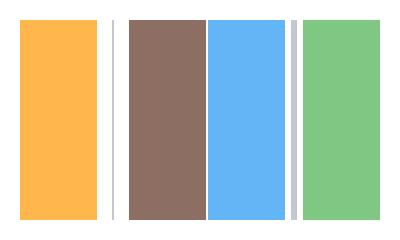
Properties
colorclass-attributeinstance-attribute
color: Optional[ColorValue] = NoneThe color to use when painting the line.
If None, flet.DividerTheme.color is used.
leading_indentclass-attributeinstance-attribute
leading_indent: Annotated[Optional[Number], V.ge(0)] = NoneThe amount of empty space to the leading edge of the divider.
If None, flet.DividerTheme.leading_indent is used.
If that's is also None, defaults to 0.0.
Raises:
- ValueError - If it is not greater than or equal to
0.
radiusclass-attributeinstance-attribute
radius: Optional[BorderRadiusValue] = NoneThe border radius of the divider.
thicknessclass-attributeinstance-attribute
thickness: Annotated[Optional[Number], V.ge(0)] = NoneThe thickness of this divider.
A divider with a thickness of 0.0 is always drawn as a line with a width of
exactly one device pixel.
If None, flet.DividerTheme.thickness is used.
If that's is also None, defaults to 0.0.
Raises:
- ValueError - If it is not greater than or equal to
0.
trailing_indentclass-attributeinstance-attribute
trailing_indent: Annotated[Optional[Number], V.ge(0)] = NoneThe amount of empty space to the trailing edge of the divider.
If None, flet.DividerTheme.trailing_indent is used.
If that's is also None, defaults to 0.0.
Raises:
- ValueError - If it is not greater than or equal to
0.
widthclass-attributeinstance-attribute
width: Annotated[Optional[Number], V.ge(0)] = NoneThe divider's width. The divider itself is always drawn as a vertical line that is centered within the width specified by this value.
If None, flet.DividerTheme.space is used.
If that's is also None, defaults to 16.0.
Raises:
- ValueError - If it is not greater than or equal to
0.