CupertinoSwitch
An iOS-style switch.
Used to toggle the on/off state of a single setting.
Example:
ft.CupertinoSwitch(value=True)

Inherits: LayoutControl
Properties
active_thumb_image_src- An image to use on the thumb of this switch when the switch is on.active_track_color- The color to use on the track when this switch is on.autofocus- Whether this switch will be selected as the initial focus.focus_color- The color to use for the focus highlight for keyboard interactions.inactive_thumb_color- The color to use on the thumb when this switch is off.inactive_thumb_image_src- An image to use on the thumb of this switch when the switch is off.inactive_track_color- The color to use on the track when this switch is off.label- The clickable label to display on the right of this switch.label_position- The position of the label relative to this switch.off_label_color- The color to use for the accessibility label when the switch is off.thumb_color- The color of this switch's thumb.thumb_icon- The icon of this Switch's thumb in various ControlStates.track_outline_color- The outline color of this switch's track in various ControlStates.track_outline_width- The outline width of this switch's track in all or specific ControlStates.value- The current value of this switch.
Events
on_blur- Called when this switch has lost focus.on_change- Called when the state of this switch is changed.on_focus- Called when this switch has received focus.on_image_error- Called when active_thumb_image_src or inactive_thumb_image_src fails to load.on_label_color- The color to use for the accessibility label when the switch is on.
Examples
Cupertino, Material and Adaptive Switches
import flet as ft


def main(page: ft.Page):
    page.add(
        ft.SafeArea(
            content=ft.Column(
                controls=[
                    ft.CupertinoSwitch(label="Cupertino Switch", value=True),
                    ft.Switch(
                        label="Material Switch",
                        value=True,
                        thumb_color={ft.ControlState.SELECTED: ft.Colors.BLUE},
                        track_color=ft.Colors.YELLOW,
                        focus_color=ft.Colors.PURPLE,
                    ),
                    ft.Container(height=20),
                    ft.Text(
                        value=(
                            "Adaptive Switch shows as CupertinoSwitch on macOS and "
                            "iOS and as Switch on other platforms:"
                        )
                    ),
                    ft.Switch(adaptive=True, label="Adaptive Switch", value=True),
                ],
            ),
        )
    )


if __name__ == "__main__":
    ft.run(main)
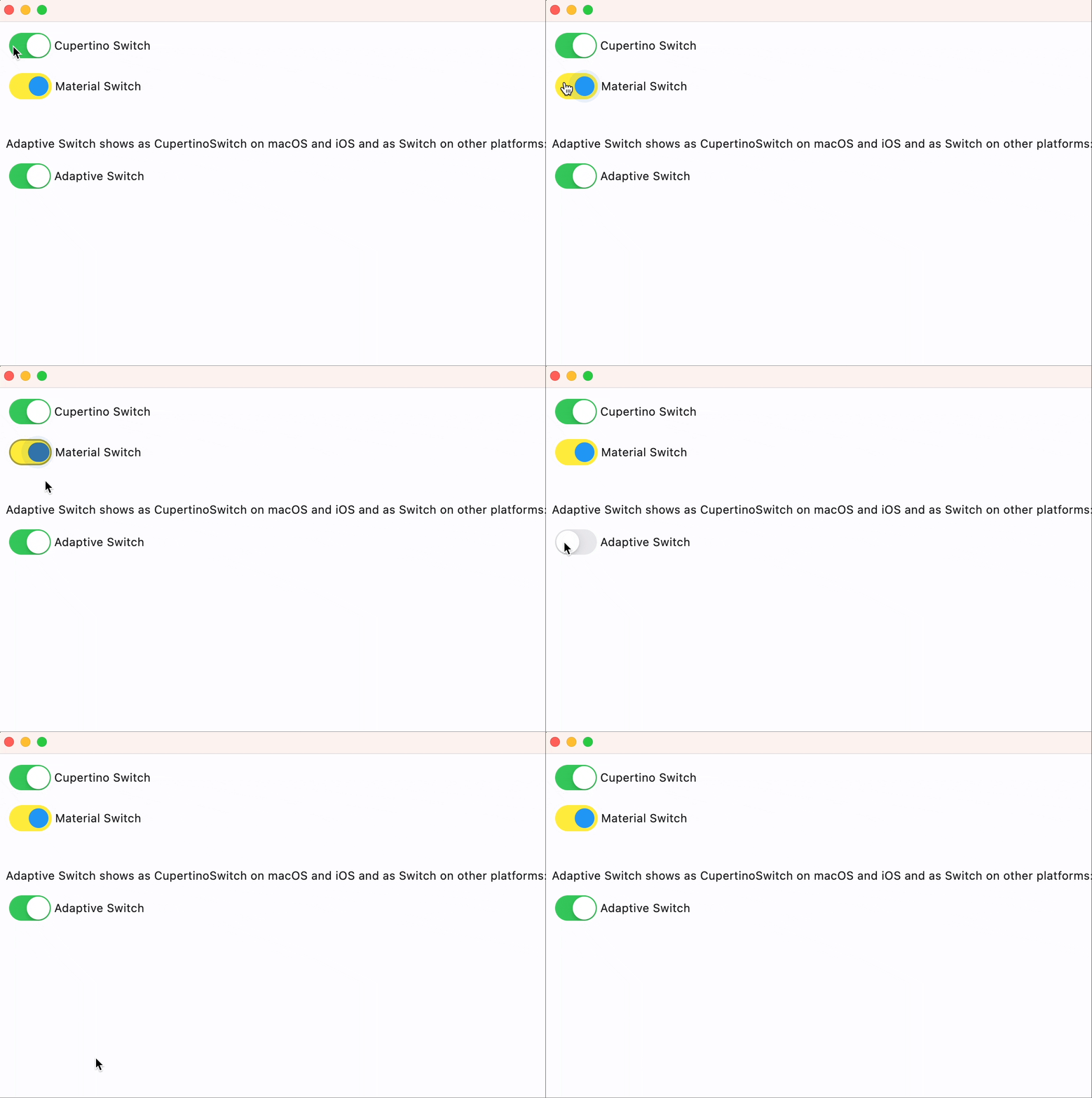
Properties
active_thumb_image_srcclass-attributeinstance-attribute
active_thumb_image_src: Optional[Union[str, bytes]] = NoneAn image to use on the thumb of this switch when the switch is on.
It can be one of the following:
- A URL or local asset file path;
- A base64 string;
- Raw bytes.
active_track_colorclass-attributeinstance-attribute
active_track_color: Optional[ColorValue] = NoneThe color to use on the track when this switch is on.
autofocusclass-attributeinstance-attribute
autofocus: bool = FalseWhether this switch will be selected as the initial focus.
If there is more than one control on a page with autofocus set, then the first one added to the page will get focus.
focus_colorclass-attributeinstance-attribute
focus_color: Optional[ColorValue] = NoneThe color to use for the focus highlight for keyboard interactions.
inactive_thumb_colorclass-attributeinstance-attribute
inactive_thumb_color: Optional[ColorValue] = NoneThe color to use on the thumb when this switch is off.
If None, defaults to thumb_color, and if this is also None,
defaults to flet.CupertinoColors.WHITE.
inactive_thumb_image_srcclass-attributeinstance-attribute
inactive_thumb_image_src: Optional[Union[str, bytes]] = NoneAn image to use on the thumb of this switch when the switch is off.
It can be one of the following:
- A URL or local asset file path;
- A base64 string;
- Raw bytes.
inactive_track_colorclass-attributeinstance-attribute
inactive_track_color: Optional[ColorValue] = NoneThe color to use on the track when this switch is off.
labelclass-attributeinstance-attribute
label: Optional[str] = NoneThe clickable label to display on the right of this switch.
label_positionclass-attributeinstance-attribute
label_position: LabelPosition = LabelPosition.RIGHTThe position of the label relative to this switch.
off_label_colorclass-attributeinstance-attribute
off_label_color: Optional[ColorValue] = NoneThe color to use for the accessibility label when the switch is off.
thumb_colorclass-attributeinstance-attribute
thumb_color: Optional[ColorValue] = NoneThe color of this switch's thumb.
thumb_iconclass-attributeinstance-attribute
thumb_icon: Optional[ControlStateValue[IconData]] = NoneThe icon of this Switch's thumb in various ControlStates.
Supported states: flet.ControlState.SELECTED, flet.ControlState.HOVERED, flet.ControlState.DISABLED, flet.ControlState.FOCUSED, and flet.ControlState.DEFAULT.
track_outline_colorclass-attributeinstance-attribute
track_outline_color: Optional[ControlStateValue[ColorValue]] = NoneThe outline color of this switch's track in various ControlStates.
Supported states: flet.ControlState.SELECTED, flet.ControlState.HOVERED, flet.ControlState.DISABLED, flet.ControlState.FOCUSED, and flet.ControlState.DEFAULT.
track_outline_widthclass-attributeinstance-attribute
track_outline_width: Optional[ControlStateValue[Optional[Number]]] = NoneThe outline width of this switch's track in all or specific ControlStates.
Supported states: flet.ControlState.SELECTED, flet.ControlState.HOVERED, flet.ControlState.DISABLED, flet.ControlState.FOCUSED, and flet.ControlState.DEFAULT.
Events
on_blurclass-attributeinstance-attribute
on_blur: Optional[ControlEventHandler[CupertinoSwitch]] = NoneCalled when this switch has lost focus.
on_changeclass-attributeinstance-attribute
on_change: Optional[ControlEventHandler[CupertinoSwitch]] = NoneCalled when the state of this switch is changed.
on_focusclass-attributeinstance-attribute
on_focus: Optional[ControlEventHandler[CupertinoSwitch]] = NoneCalled when this switch has received focus.
on_image_errorclass-attributeinstance-attribute
on_image_error: Optional[ControlEventHandler[CupertinoSwitch]] = NoneCalled when active_thumb_image_src or inactive_thumb_image_src fails to load.
on_label_colorclass-attributeinstance-attribute
on_label_color: Optional[ColorValue] = NoneThe color to use for the accessibility label when the switch is on.