FloatingActionButton
A floating action button is a circular icon button that hovers over content to promote a primary action in the application. Floating action button is usually set to page.floating_action_button, but can also be added as a regular control at any place on a page.
Example:
ft.FloatingActionButton(icon=ft.Icons.ADD)
Inherits: LayoutControl
Properties
autofocus- True if the control will be selected as the initial focus.bgcolor- Button background color.clip_behavior- Defines how the content is clipped.content- The content of this button.disabled_elevation- The elevation of this button when disabled.elevation- The elevation of this button.enable_feedback- Whether detected gestures should provide acoustic and/or haptic feedback.focus_color- The color to use for filling this button when it has input focus.focus_elevation- The elevation of this button when it has input focus.foreground_color- The default foreground color for icons and text within this button.highlight_elevation- The elevation of this button when it is highlighted.hover_color- The color to use for filling this button when hovered.hover_elevation- The elevation of this button it is enabled and being hovered over.icon- Icon shown in this button.mini- Controls the size of this button.mouse_cursor- The cursor to be displayed when a mouse pointer enters or is hovering over this control.shape- The shape of the FAB's border.splash_color- The color to use for the ink splash.url- The URL to open when this button is clicked.
Events
on_click- Called when a user clicks this button.
Examples
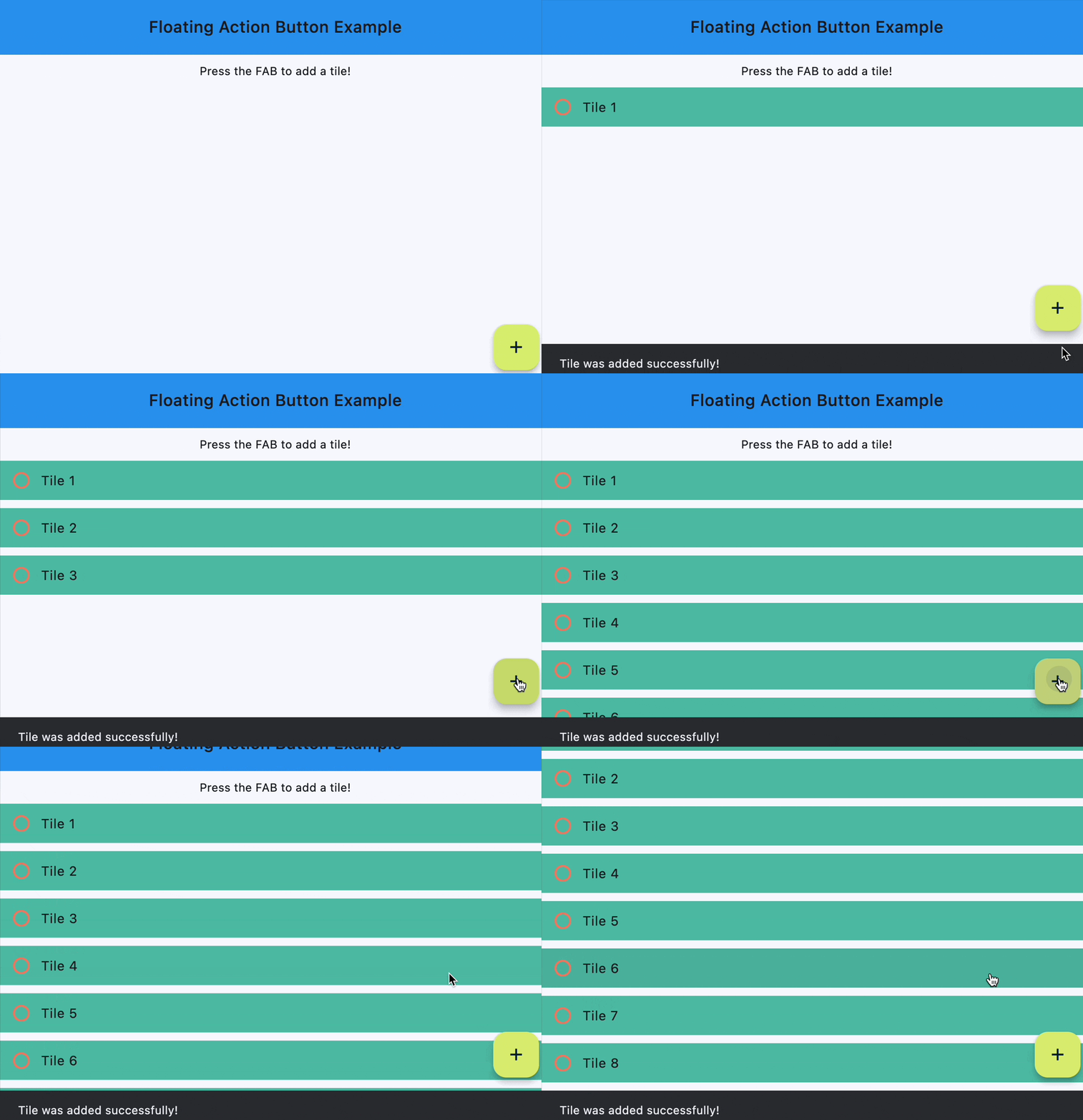
Handling clicks
import flet as ft


def main(page: ft.Page):
    page.title = "Floating Action Button"
    page.theme_mode = ft.ThemeMode.LIGHT
    page.horizontal_alignment = ft.CrossAxisAlignment.CENTER
    page.padding = 0
    page.scroll = ft.ScrollMode.HIDDEN

    count = 1

    def handle_fab_click(e: ft.Event[ft.FloatingActionButton]):
        nonlocal count
        page.add(
            ft.ListTile(
                title=ft.Text(f"Tile {count}"),
                bgcolor=ft.Colors.TEAL_300,
                leading=ft.Icon(
                    ft.Icons.CIRCLE_OUTLINED,
                    color=ft.Colors.DEEP_ORANGE_300,
                ),
                on_click=lambda x: print(x.control.title.value + " was clicked!"),
            )
        )
        page.show_dialog(ft.SnackBar(ft.Text("Tile was added successfully!")))
        count += 1

    page.floating_action_button = ft.FloatingActionButton(
        icon=ft.Icons.ADD,
        on_click=handle_fab_click,
        bgcolor=ft.Colors.LIME_300,
    )

    page.add(
        ft.SafeArea(
            content=ft.Column(
                controls=[
                    ft.Container(
                        bgcolor=ft.Colors.BLUE,
                        padding=ft.Padding.all(20),
                        content=ft.Row(
                            alignment=ft.MainAxisAlignment.CENTER,
                            controls=[
                                ft.Text(
                                    value="Floating Action Button Example",
                                    style=ft.TextStyle(
                                        size=20,
                                        weight=ft.FontWeight.W_500,
                                    ),
                                )
                            ],
                        ),
                    ),
                    ft.Text("Press the FAB to add a tile!"),
                ],
            ),
        )
    )


if __name__ == "__main__":
    ft.run(main)
Properties
autofocusclass-attributeinstance-attribute
autofocus: bool = FalseTrue if the control will be selected as the initial focus. If there is more than one control on a page with autofocus set, then the first one added to the page will get focus.
bgcolorclass-attributeinstance-attribute
bgcolor: Optional[ColorValue] = NoneButton background color.
clip_behaviorclass-attributeinstance-attribute
clip_behavior: ClipBehavior = ClipBehavior.NONEDefines how the content is clipped.
contentclass-attributeinstance-attribute
content: Optional[StrOrControl] = NoneThe content of this button.
disabled_elevationclass-attributeinstance-attribute
disabled_elevation: Annotated[Optional[Number], V.ge(0)] = NoneThe elevation of this button when disabled.
Defaults to elevation.
Raises:
- ValueError - If it is not greater than or equal to
0.
elevationclass-attributeinstance-attribute
elevation: Annotated[Optional[Number], V.ge(0)] = NoneThe elevation of this button.
Defaults to 6.
Raises:
- ValueError - If it is not greater than or equal to
0.
enable_feedbackclass-attributeinstance-attribute
enable_feedback: Optional[bool] = NoneWhether detected gestures should provide acoustic and/or haptic feedback. On Android, for example, setting this to True will produce a click sound and a long-press will produce a short vibration.
focus_colorclass-attributeinstance-attribute
focus_color: Optional[ColorValue] = NoneThe color to use for filling this button when it has input focus.
focus_elevationclass-attributeinstance-attribute
focus_elevation: Annotated[Optional[Number], V.ge(0)] = NoneThe elevation of this button when it has input focus.
Defaults to 8.
Raises:
- ValueError - If it is not greater than or equal to
0.
foreground_colorclass-attributeinstance-attribute
foreground_color: Optional[ColorValue] = NoneThe default foreground color for icons and text within this button.
highlight_elevationclass-attributeinstance-attribute
highlight_elevation: Annotated[Optional[Number], V.ge(0)] = NoneThe elevation of this button when it is highlighted.
Defaults to 12.
Raises:
- ValueError - If it is not greater than or equal to
0.
hover_colorclass-attributeinstance-attribute
hover_color: Optional[ColorValue] = NoneThe color to use for filling this button when hovered.
hover_elevationclass-attributeinstance-attribute
hover_elevation: Annotated[Optional[Number], V.ge(0)] = NoneThe elevation of this button it is enabled and being hovered over.
Defaults to 8.
Raises:
- ValueError - If it is not greater than or equal to
0.
iconclass-attributeinstance-attribute
icon: Optional[IconDataOrControl] = NoneIcon shown in this button.
miniclass-attributeinstance-attribute
mini: bool = FalseControls the size of this button.
By default, floating action buttons are non-mini and have a height and width of
56.0 logical pixels. Mini floating action buttons have a height and width of
40.0 logical pixels with a layout width and height of 48.0 logical pixels.
mouse_cursorclass-attributeinstance-attribute
mouse_cursor: Optional[MouseCursor] = NoneThe cursor to be displayed when a mouse pointer enters or is hovering over this control.
shapeclass-attributeinstance-attribute
shape: Optional[OutlinedBorder] = NoneThe shape of the FAB's border.
splash_colorclass-attributeinstance-attribute
splash_color: Optional[ColorValue] = NoneThe color to use for the ink splash.
Events
on_clickclass-attributeinstance-attribute
on_click: Optional[ControlEventHandler[FloatingActionButton]] = NoneCalled when a user clicks this button.