SegmentedButton
A segmented button control.

Inherits: LayoutControl
Properties
allow_empty_selection- A boolean value that indicates if having no selected segments is allowed.allow_multiple_selection- A boolean value that indicates if multiple segments can be selected at one time.direction- The orientation of the button'ssegments.padding- Defines the button's size and padding.segments- The segments of this button.selected- A set ofSegment.values that indicate which segments are selected.selected_icon- AnIconcontrol that is used to indicate a segment is selected.show_selected_icon- A boolean value that indicates if theselected_iconis displayed on theselectedsegments.style- Customizes this button's appearance.
Events
on_change- Called when the selection changes.
Examples
Basic Example
import flet as ft


def main(page: ft.Page):
    def handle_selection_change(e: ft.Event[ft.SegmentedButton]):
        print(e)

    page.add(
        ft.SafeArea(
            content=ft.Column(
                controls=[
                    ft.SegmentedButton(
                        on_change=handle_selection_change,
                        selected_icon=ft.Icon(ft.Icons.CHECK_SHARP),
                        selected=["1", "4"],
                        allow_empty_selection=True,
                        allow_multiple_selection=True,
                        segments=[
                            ft.Segment(
                                value="1",
                                label=ft.Text("One"),
                                icon=ft.Icon(ft.Icons.LOOKS_ONE),
                            ),
                            ft.Segment(
                                value="2",
                                label=ft.Text("Two"),
                                icon=ft.Icon(ft.Icons.LOOKS_TWO),
                            ),
                            ft.Segment(
                                value="3",
                                label=ft.Text("Three"),
                                icon=ft.Icon(ft.Icons.LOOKS_3),
                            ),
                            ft.Segment(
                                value="4",
                                label=ft.Text("Four"),
                                icon=ft.Icon(ft.Icons.LOOKS_4),
                            ),
                        ],
                    ),
                    ft.SegmentedButton(
                        on_change=handle_selection_change,
                        selected_icon=ft.Icon(ft.Icons.CHECK_SHARP),
                        selected=["2"],
                        allow_multiple_selection=False,
                        segments=[
                            ft.Segment(
                                value="1",
                                label=ft.Text("One"),
                                icon=ft.Icon(ft.Icons.LOOKS_ONE),
                            ),
                            ft.Segment(
                                value="2",
                                label=ft.Text("Two"),
                                icon=ft.Icon(ft.Icons.LOOKS_TWO),
                            ),
                            ft.Segment(
                                value="3",
                                label=ft.Text("Three"),
                                icon=ft.Icon(ft.Icons.LOOKS_3),
                            ),
                            ft.Segment(
                                value="4",
                                label=ft.Text("Four"),
                                icon=ft.Icon(ft.Icons.LOOKS_4),
                            ),
                        ],
                    ),
                ]
            )
        )
    )


if __name__ == "__main__":
    ft.run(main)
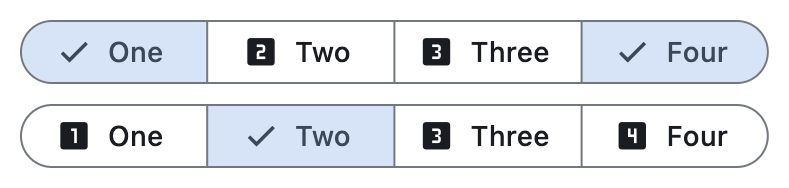
Properties
allow_empty_selectionclass-attributeinstance-attribute
allow_empty_selection: bool = FalseA boolean value that indicates if having no selected segments is allowed.
If True, then it is acceptable for none of the segments to be selected and also
that selected can be empty.
If False (the default), there must be at least one segment selected. If the user
taps on the only selected segment it will not be deselected, and on_change will
not be called.
Raises:
- ValueError - If selected is empty while allow_empty_selection is
False.
allow_multiple_selectionclass-attributeinstance-attribute
allow_multiple_selection: bool = FalseA boolean value that indicates if multiple segments can be selected at one time.
If True, more than one segment can be selected. When selecting a segment, the
other selected segments will stay selected. Selecting an already selected segment
will unselect it.
If False (the default), only one segment may be selected at a time. When a segment
is selected, any previously selected segment will be unselected.
Raises:
- ValueError - If selected has more than one item while allow_multiple_selection is
False.
directionclass-attributeinstance-attribute
direction: Optional[Axis] = NoneThe orientation of the button's segments.
Defaults
to Axis.HORIZONTAL.
paddingclass-attributeinstance-attribute
padding: Optional[PaddingValue] = NoneDefines the button's size and padding. If specified, the button expands to fill its parent's space with this padding.
When None, the button adopts its intrinsic content size.
segmentsinstance-attribute
segments: Annotated[list[Segment], V.visible_controls(min_count=1)]The segments of this button.
Raises:
- ValueError - If it does not contain at least one visible
Segment.
selectedclass-attributeinstance-attribute
selected: list[str] = field(default_factory=list)A set of Segment.values that indicate which segments are selected. It is updated when the user (un)selects a segment.
Raises:
- ValueError - If selected violates the constraints defined by allow_empty_selection or allow_multiple_selection.
selected_iconclass-attributeinstance-attribute
selected_icon: Optional[IconDataOrControl] = NoneAn Icon control that is used to indicate a segment is selected.
If show_selected_icon is True then for selected segments this icon will be
shown before the Segment.label, replacing the Segment.icon if it is specified.
Defaults to an Icon with the CHECK icon.
show_selected_iconclass-attributeinstance-attribute
show_selected_icon: bool = TrueA boolean value that indicates if the selected_icon is displayed on the selected segments.
If True, the selected_icon will be displayed at the start of the selected
segments.
If False, then the selected_icon is not used and will not be displayed on
selected segments.
styleclass-attributeinstance-attribute
style: Optional[ButtonStyle] = NoneCustomizes this button's appearance.
Events
on_changeclass-attributeinstance-attribute
on_change: Optional[ControlEventHandler[SegmentedButton]] = NoneCalled when the selection changes.
The data property of the event handler argument contains a list of strings identifying the selected segments.