MenuBar
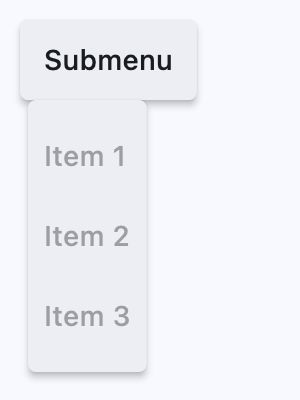
A menu bar that manages cascading child menus.
It could be placed anywhere but typically resides above the main body of the application and defines a menu system for invoking callbacks in response to user selection of a menu item.
ft.MenuBar(
    controls=[
        ft.SubmenuButton(
            content=ft.Text("Submenu"),
            controls=[
                ft.MenuItemButton(content=ft.Text("Item 1")),
                ft.MenuItemButton(content=ft.Text("Item 2")),
                ft.MenuItemButton(content=ft.Text("Item 3")),
            ],
        ),
    ],
)
Inherits: Control
Properties
clip_behavior- Whether to clip the content of this control or not.controls- A list of top-level menu controls to display in this menu bar.style- The menu bar style.
Examples
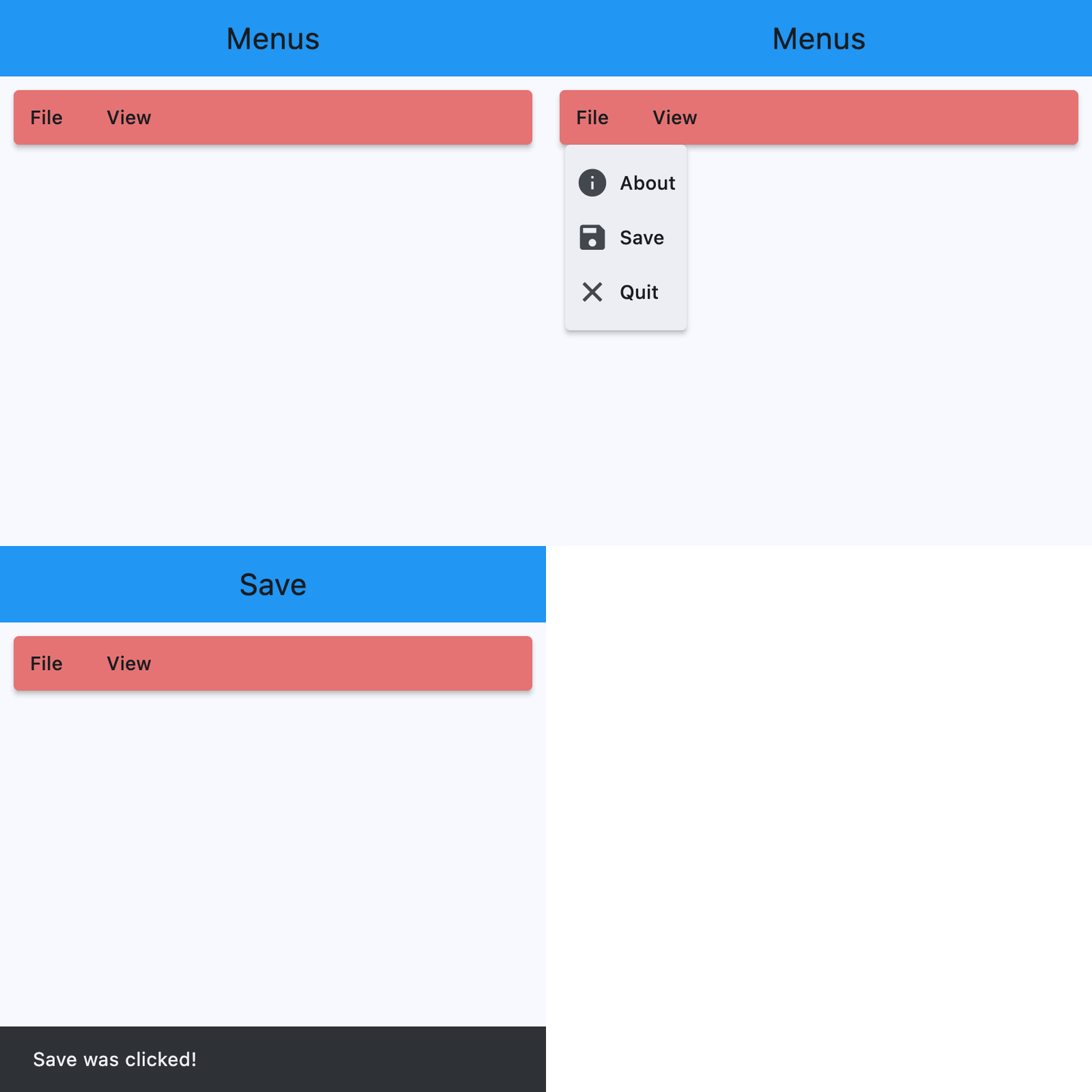
MenuBar with Nested Submenus
import flet as ft


def main(page: ft.Page):
    appbar_text_ref = ft.Ref[ft.Text]()

    def handle_menu_item_click(e: ft.Event[ft.MenuItemButton]):
        text = e.control.content.value
        page.show_dialog(ft.SnackBar(ft.Text(f"{text} was clicked!")))
        appbar_text_ref.current.value = text
        appbar_text_ref.current.update()

    def handle_submenu_open(e: ft.Event[ft.SubmenuButton]):
        print(f"{e.control.content.value}.on_open")

    def handle_submenu_close(e: ft.Event[ft.SubmenuButton]):
        print(f"{e.control.content.value}.on_close")

    def handle_submenu_hover(e: ft.Event[ft.SubmenuButton]):
        print(f"{e.control.content.value}.on_hover")

    page.appbar = ft.AppBar(
        title=ft.Text("Menus", ref=appbar_text_ref),
        center_title=True,
        bgcolor=ft.Colors.BLUE,
    )

    page.add(
        ft.SafeArea(
            content=ft.Row(
                controls=[
                    ft.MenuBar(
                        expand=True,
                        style=ft.MenuStyle(
                            alignment=ft.Alignment.TOP_LEFT,
                            bgcolor=ft.Colors.RED_300,
                            mouse_cursor={
                                ft.ControlState.HOVERED: ft.MouseCursor.WAIT,
                                ft.ControlState.DEFAULT: ft.MouseCursor.ZOOM_OUT,
                            },
                        ),
                        controls=[
                            ft.SubmenuButton(
                                content=ft.Text("File"),
                                on_open=handle_submenu_open,
                                on_close=handle_submenu_close,
                                on_hover=handle_submenu_hover,
                                controls=[
                                    ft.MenuItemButton(
                                        content=ft.Text("About"),
                                        leading=ft.Icon(ft.Icons.INFO),
                                        on_click=handle_menu_item_click,
                                        style=ft.ButtonStyle(
                                            bgcolor={
                                                ft.ControlState.HOVERED: (
                                                    ft.Colors.GREEN_100
                                                )
                                            }
                                        ),
                                    ),
                                    ft.MenuItemButton(
                                        content=ft.Text("Save"),
                                        leading=ft.Icon(ft.Icons.SAVE),
                                        on_click=handle_menu_item_click,
                                        style=ft.ButtonStyle(
                                            bgcolor={
                                                ft.ControlState.HOVERED: (
                                                    ft.Colors.GREEN_100
                                                )
                                            }
                                        ),
                                    ),
                                    ft.MenuItemButton(
                                        content=ft.Text("Quit"),
                                        leading=ft.Icon(ft.Icons.CLOSE),
                                        on_click=handle_menu_item_click,
                                        style=ft.ButtonStyle(
                                            bgcolor={
                                                ft.ControlState.HOVERED: (
                                                    ft.Colors.GREEN_100
                                                )
                                            }
                                        ),
                                    ),
                                ],
                            ),
                            ft.SubmenuButton(
                                content=ft.Text("View"),
                                on_open=handle_submenu_open,
                                on_close=handle_submenu_close,
                                on_hover=handle_submenu_hover,
                                controls=[
                                    ft.SubmenuButton(
                                        content=ft.Text("Zoom"),
                                        controls=[
                                            ft.MenuItemButton(
                                                content=ft.Text("Magnify"),
                                                leading=ft.Icon(ft.Icons.ZOOM_IN),
                                                close_on_click=False,
                                                on_click=handle_menu_item_click,
                                                style=ft.ButtonStyle(
                                                    bgcolor={
                                                        ft.ControlState.HOVERED: (
                                                            ft.Colors.PURPLE_200
                                                        )
                                                    }
                                                ),
                                            ),
                                            ft.MenuItemButton(
                                                content=ft.Text("Minify"),
                                                leading=ft.Icon(ft.Icons.ZOOM_OUT),
                                                close_on_click=False,
                                                on_click=handle_menu_item_click,
                                                style=ft.ButtonStyle(
                                                    bgcolor={
                                                        ft.ControlState.HOVERED: (
                                                            ft.Colors.PURPLE_200
                                                        )
                                                    }
                                                ),
                                            ),
                                        ],
                                    )
                                ],
                            ),
                        ],
                    )
                ],
            ),
        )
    )


if __name__ == "__main__":
    ft.run(main)
Properties
clip_behaviorclass-attributeinstance-attribute
clip_behavior: ClipBehavior = ClipBehavior.NONEWhether to clip the content of this control or not.