Switch
A toggle represents a physical switch that allows someone to choose between two mutually exclusive options.
For example, "On/Off", "Show/Hide".
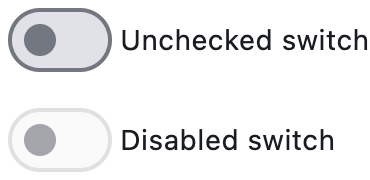
    ft.Switch(label="Unchecked switch", value=False)
    ft.Switch(label="Disabled switch", disabled=True)
Inherits: LayoutControl, AdaptiveControl
Properties
active_color- The color to use when this switch is on.active_track_color- The color to use on the track when this switch is on.adaptive- Whether an adaptive Switch should be created based on the target platform.autofocus- Whether this switch will be selected as the initial focus.focus_color- The color to use for the focus highlight for keyboard interactions.hover_color- The color to be used when it is being hovered over by the mouse pointer.inactive_thumb_color- The color to use on the thumb when this switch is off.inactive_track_color- The color to use on the track when this switch is off.label- The clickable label to display on the right of this switch.label_position- The position of the label, if provided.label_text_style- The label's text style, when it is a string.mouse_cursor- The cursor to be displayed when a mouse pointer enters or is hovering over this control.overlay_color- The color for the switch's Material in various ControlState states.padding- The amount of space to surround the child inside the bounds of the Switch.splash_radius- The radius of the splash effect when the switch is pressed.thumb_color- The color of this switch's thumb in various ControlState states.thumb_icon- The icon of this Switch's thumb in various ControlState states.track_color- The color of this switch's track in various ControlState states.track_outline_color- The outline color of this switch's track in various ControlState states.track_outline_width- The outline width of this switch's track in all or specific ControlState states.value- Current value of this switch.
Events
Examples
Basic Example
import flet as ft


def main(page: ft.Page):
    def handle_button_click(e: ft.Event[ft.Button]):
        message.value = (
            f"Switch values are:  {c1.value}, {c2.value}, {c3.value}, {c4.value}."
        )

    page.add(
        ft.SafeArea(
            content=ft.Column(
                controls=[
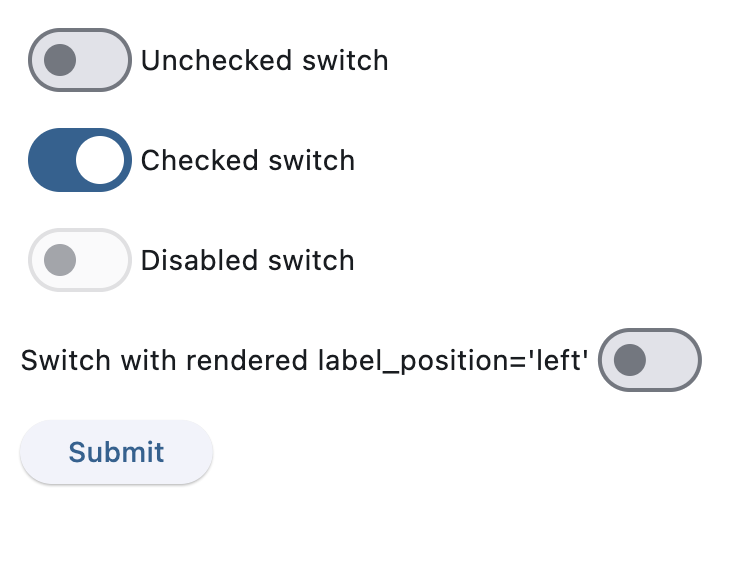
                    c1 := ft.Switch(label="Unchecked switch", value=False),
                    c2 := ft.Switch(label="Checked switch", value=True),
                    c3 := ft.Switch(label="Disabled switch", disabled=True),
                    c4 := ft.Switch(
                        label="Switch with rendered label_position='left'",
                        label_position=ft.LabelPosition.LEFT,
                    ),
                    ft.Button(content="Submit", on_click=handle_button_click),
                    message := ft.Text(),
                ],
            ),
        )
    )


if __name__ == "__main__":
    ft.run(main)
Handling change events
import flet as ft


def main(page: ft.Page):
    def handle_switch_change(e: ft.Event[ft.Switch]):
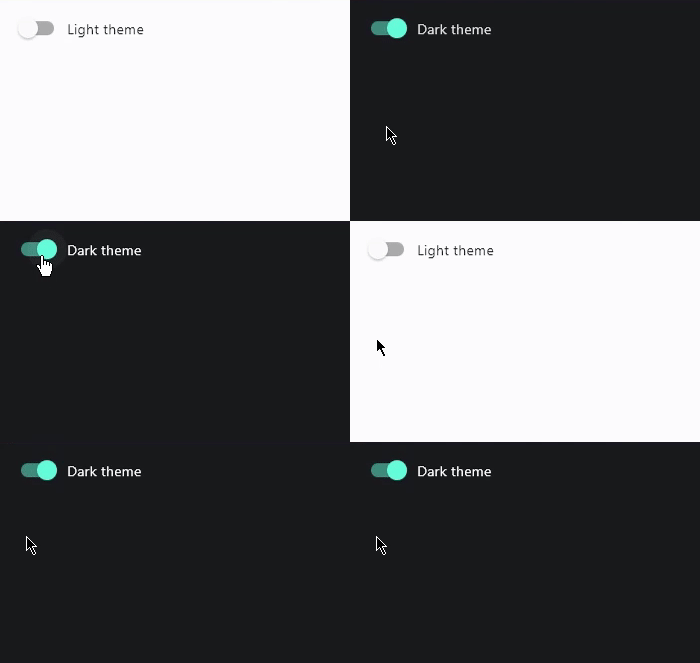
        page.theme_mode = ft.ThemeMode.DARK if e.control.value else ft.ThemeMode.LIGHT
        e.control.label = (
            "Light ThemeMode"
            if page.theme_mode == ft.ThemeMode.LIGHT
            else "Dark ThemeMode"
        )

    page.theme_mode = ft.ThemeMode.LIGHT
    page.add(
        ft.SafeArea(
            content=ft.Switch(label="Light ThemeMode", on_change=handle_switch_change)
        )
    )


if __name__ == "__main__":
    ft.run(main)
Properties
active_colorclass-attributeinstance-attribute
active_color: Optional[ColorValue] = NoneThe color to use when this switch is on.
active_track_colorclass-attributeinstance-attribute
active_track_color: Optional[ColorValue] = NoneThe color to use on the track when this switch is on.
If track_color returns a non-none color in
the ControlState.SELECTED state, it will
be used instead of this color.
adaptiveclass-attributeinstance-attribute
adaptive: Optional[bool] = NoneWhether an adaptive Switch should be created based on the target platform.
On iOS and macOS, a CupertinoSwitch is created,
which has matching functionality and presentation as Switch,
and the graphics as expected on iOS. On other platforms,
a Material Switch is created.
Defaults to False. See the example of usage
here.
autofocusclass-attributeinstance-attribute
autofocus: bool = FalseWhether this switch will be selected as the initial focus. If there is more than one control on a page with autofocus set, then the first one added to the page will get focus.
focus_colorclass-attributeinstance-attribute
focus_color: Optional[ColorValue] = NoneThe color to use for the focus highlight for keyboard interactions.
hover_colorclass-attributeinstance-attribute
hover_color: Optional[ColorValue] = NoneThe color to be used when it is being hovered over by the mouse pointer.
inactive_thumb_colorclass-attributeinstance-attribute
inactive_thumb_color: Optional[ColorValue] = NoneThe color to use on the thumb when this switch is off.
Defaults to colors defined in the material design specification.
If thumb_color returns a non-none color
in the ControlState.DEFAULT state, it will be
used instead of this color.
inactive_track_colorclass-attributeinstance-attribute
inactive_track_color: Optional[ColorValue] = NoneThe color to use on the track when this switch is off.
Defaults to colors defined in the material design specification.
If track_color returns a non-none color
in the ControlState.DEFAULT state, it will be
used instead of this color.
labelclass-attributeinstance-attribute
label: Optional[StrOrControl] = NoneThe clickable label to display on the right of this switch.
label_positionclass-attributeinstance-attribute
label_position: LabelPosition = LabelPosition.RIGHTThe position of the label, if provided.
label_text_styleclass-attributeinstance-attribute
label_text_style: Optional[TextStyle] = NoneThe label's text style, when it is a string.
mouse_cursorclass-attributeinstance-attribute
mouse_cursor: Optional[MouseCursor] = NoneThe cursor to be displayed when a mouse pointer enters or is hovering over this control.
overlay_colorclass-attributeinstance-attribute
overlay_color: Optional[ControlStateValue[ColorValue]] = NoneThe color for the switch's Material in various ControlState states.
The following states are supported: ControlState.PRESSED,
ControlState.SELECTED, ControlState.HOVERED, ControlState.FOCUSED and
ControlState.DEFAULT.
paddingclass-attributeinstance-attribute
padding: Optional[PaddingValue] = NoneThe amount of space to surround the child inside the bounds of the Switch.
Defaults to horizontal padding of 4 pixels. If flet.Theme.use_material3 is false, then there is no padding by default.
splash_radiusclass-attributeinstance-attribute
splash_radius: Annotated[Optional[Number], V.ge(0)] = NoneThe radius of the splash effect when the switch is pressed.
Raises:
- ValueError - If it is not greater than or equal to
0.
thumb_colorclass-attributeinstance-attribute
thumb_color: Optional[ControlStateValue[ColorValue]] = NoneThe color of this switch's thumb in various ControlState states.
The following states are supported: ControlState.SELECTED, ControlState.HOVERED,
ControlState.DISABLED, ControlState.FOCUSED and
ControlState.DEFAULT (fallback).
thumb_iconclass-attributeinstance-attribute
thumb_icon: Optional[ControlStateValue[IconData]] = NoneThe icon of this Switch's thumb in various ControlState states.
The following states are supported: ControlState.SELECTED, ControlState.HOVERED,
ControlState.DISABLED, ControlState.FOCUSED and
ControlState.DEFAULT (fallback).
track_colorclass-attributeinstance-attribute
track_color: Optional[ControlStateValue[ColorValue]] = NoneThe color of this switch's track in various ControlState states.
The following states are supported: ControlState.SELECTED,
ControlState.HOVERED, ControlState.DISABLED, ControlState.FOCUSED and
ControlState.DEFAULT (fallback).
track_outline_colorclass-attributeinstance-attribute
track_outline_color: Optional[ControlStateValue[ColorValue]] = NoneThe outline color of this switch's track in various ControlState states.
The following states are supported: ControlState.SELECTED,
ControlState.HOVERED, ControlState.DISABLED, ControlState.FOCUSED and
ControlState.DEFAULT (fallback).
track_outline_widthclass-attributeinstance-attribute
track_outline_width: Optional[ControlStateValue[Optional[Number]]] = NoneThe outline width of this switch's track in all or specific ControlState states.
The following states are supported: ControlState.SELECTED,
ControlState.HOVERED, ControlState.DISABLED,
ControlState.FOCUSED and ControlState.DEFAULT (fallback).
Events
on_blurclass-attributeinstance-attribute
on_blur: Optional[ControlEventHandler[Switch]] = NoneCalled when the control has lost focus.
on_changeclass-attributeinstance-attribute
on_change: Optional[ControlEventHandler[Switch]] = NoneCalled when the state of the Switch is changed.
on_focusclass-attributeinstance-attribute
on_focus: Optional[ControlEventHandler[Switch]] = NoneCalled when the control has received focus.