MenuItemButton
A button for use in a MenuBar or on its own, that can be activated by click or keyboard navigation.
ft.Row(
    controls=[
        ft.MenuItemButton(
            content=ft.Text("Yes"),
            on_click=lambda e: print("yes"),
        ),
        ft.MenuItemButton(
            content=ft.Text("No"),
            on_click=lambda e: print("no"),
        ),
        ft.MenuItemButton(
            content=ft.Text("Maybe"),
            on_click=lambda e: print("maybe"),
        ),
    ],
)

Inherits: LayoutControl
Properties
autofocus- Whether this button should automatically request focus.clip_behavior- Whether to clip the content of this control or not.close_on_click- Defines if the menu will be closed when theMenuItemButtonis clicked.content- The child control or text to be displayed in the center of this button.focus_on_hover- Determine if hovering can request focus.leading- An optional control to display before thecontent.overflow_axis- The direction in which the menu item expands.semantic_label- A string that describes the button's action to assistive technologies.style- Customizes this button's appearance.trailing- An optional control to display after thecontent.
Events
Examples
Basic Example
import flet as ft


def main(page: ft.Page):
    page.padding = 0
    page.spacing = 0
    page.theme_mode = ft.ThemeMode.LIGHT

    def handle_color_click(e: ft.Event[ft.MenuItemButton]):
        color = e.control.content.value
        background_container.content.value = f"{color} background color"
        background_container.bgcolor = color.lower()

    def handle_on_hover(e: ft.Event[ft.MenuItemButton]):
        print(e)

    menubar = ft.MenuBar(
        expand=True,
        controls=[
            ft.SubmenuButton(
                content=ft.Text("BgColors"),
                controls=[
                    ft.MenuItemButton(
                        content=ft.Text("Blue"),
                        leading=ft.Icon(ft.Icons.COLORIZE),
                        style=ft.ButtonStyle(
                            bgcolor={ft.ControlState.HOVERED: ft.Colors.BLUE}
                        ),
                        on_click=handle_color_click,
                        on_hover=handle_on_hover,
                    ),
                    ft.MenuItemButton(
                        content=ft.Text("Green"),
                        leading=ft.Icon(ft.Icons.COLORIZE),
                        style=ft.ButtonStyle(
                            bgcolor={ft.ControlState.HOVERED: ft.Colors.GREEN}
                        ),
                        on_click=handle_color_click,
                        on_hover=handle_on_hover,
                    ),
                    ft.MenuItemButton(
                        content=ft.Text("Red"),
                        leading=ft.Icon(ft.Icons.COLORIZE),
                        style=ft.ButtonStyle(
                            bgcolor={ft.ControlState.HOVERED: ft.Colors.RED}
                        ),
                        on_click=handle_color_click,
                        on_hover=handle_on_hover,
                    ),
                ],
            ),
        ],
    )

    page.add(
        ft.SafeArea(
            expand=True,
            avoid_intrusions_left=False,
            avoid_intrusions_top=False,
            avoid_intrusions_right=False,
            avoid_intrusions_bottom=False,
            content=ft.Column(
                expand=True,
                spacing=0,
                controls=[
                    ft.Row(controls=[menubar]),
                    background_container := ft.Container(
                        expand=True,
                        bgcolor=ft.Colors.WHITE,
                        alignment=ft.Alignment.CENTER,
                        content=ft.Text(
                            value="Choose a bgcolor from the menu",
                            style=ft.TextStyle(weight=ft.FontWeight.W_500),
                        ),
                    ),
                ],
            ),
        )
    )


if __name__ == "__main__":
    ft.run(main)
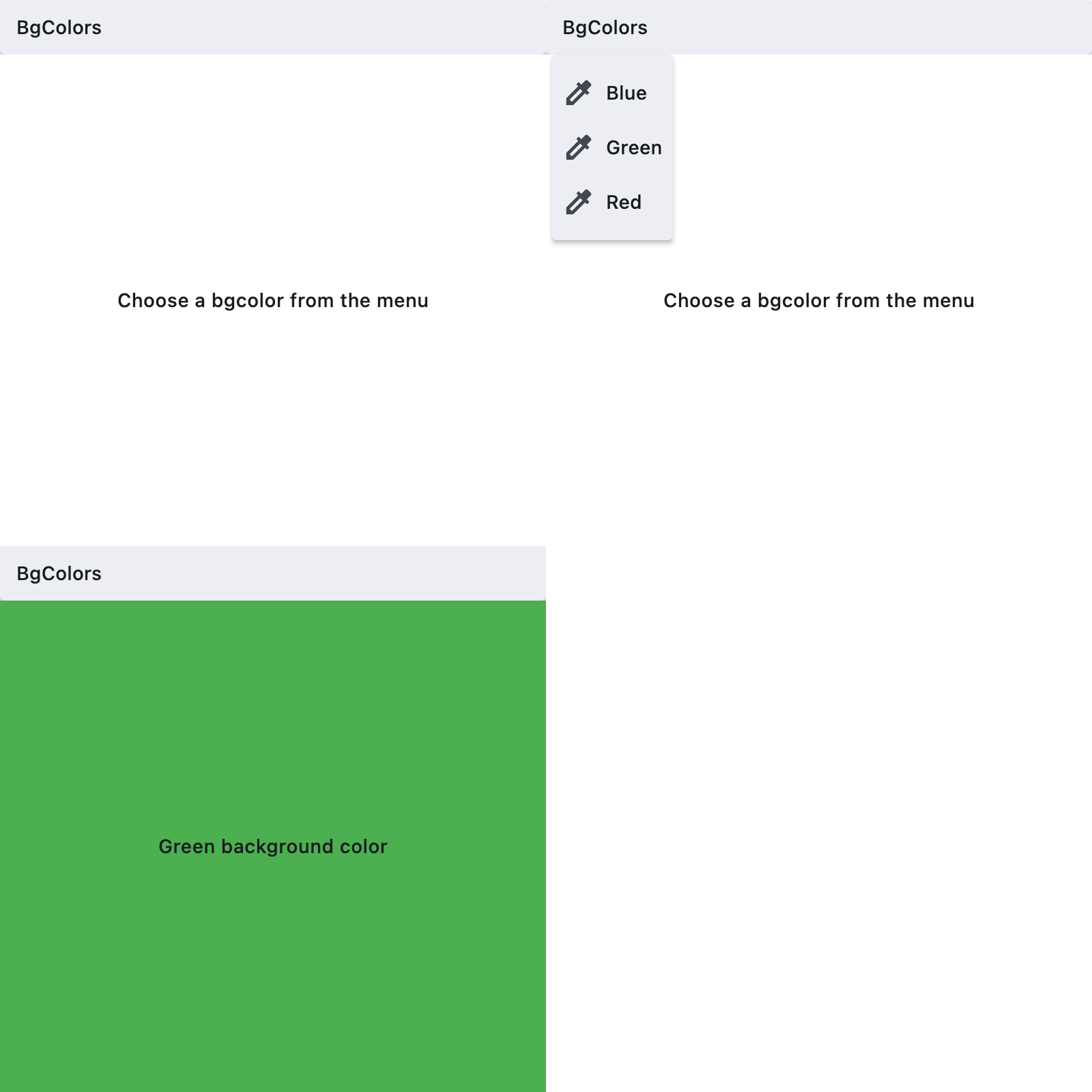
Properties
autofocusclass-attributeinstance-attribute
autofocus: bool = FalseWhether this button should automatically request focus.
Defaults to False.
clip_behaviorclass-attributeinstance-attribute
clip_behavior: ClipBehavior = ClipBehavior.NONEWhether to clip the content of this control or not.
close_on_clickclass-attributeinstance-attribute
close_on_click: bool = TrueDefines if the menu will be closed when the MenuItemButton is clicked.
contentclass-attributeinstance-attribute
content: Optional[StrOrControl] = NoneThe child control or text to be displayed in the center of this button.
Typically this is the button's label, using a Text control.
focus_on_hoverclass-attributeinstance-attribute
focus_on_hover: bool = TrueDetermine if hovering can request focus.
leadingclass-attributeinstance-attribute
leading: Optional[Control] = NoneAn optional control to display before the content.
Typically an Icon control.
overflow_axisclass-attributeinstance-attribute
overflow_axis: Axis = Axis.HORIZONTALThe direction in which the menu item expands.
If the menu item button is a descendent of MenuBar, then this property is ignored.
semantic_labelclass-attributeinstance-attribute
semantic_label: Optional[str] = NoneA string that describes the button's action to assistive technologies.
styleclass-attributeinstance-attribute
style: Optional[ButtonStyle] = NoneCustomizes this button's appearance.
Events
on_blurclass-attributeinstance-attribute
on_blur: Optional[ControlEventHandler[MenuItemButton]] = NoneCalled when this button loses focus.
on_clickclass-attributeinstance-attribute
on_click: Optional[ControlEventHandler[MenuItemButton]] = NoneCalled when the button is clicked.If not defined the button will be disabled.
on_focusclass-attributeinstance-attribute
on_focus: Optional[ControlEventHandler[MenuItemButton]] = NoneCalled when the button receives focus.
on_hoverclass-attributeinstance-attribute
on_hover: Optional[ControlEventHandler[MenuItemButton]] = NoneCalled when the button is hovered.