ListTile
A single fixed-height row that typically contains some text as well as a leading or trailing icon.
Example:
ft.ListTile(
    width=400,
    leading=ft.Icon(ft.Icons.ACCOUNT_CIRCLE),
    title="Jane Doe",
    subtitle="Product Manager",
    trailing=ft.Icon(ft.Icons.CHEVRON_RIGHT),
    bgcolor=ft.Colors.SURFACE_CONTAINER_LOW,
)

Inherits: LayoutControl, AdaptiveControl
Properties
autofocus-Trueif the control will be selected as the initial focus.bgcolor- The list tile's background color.content_padding- The tile's internal padding.dense- Whether this list tile is part of a vertically dense list.enable_feedback- Whether detected gestures should provide acoustic and/or haptic feedback.horizontal_spacing- The horizontal gap between thetitleand the leading and trailing controls.hover_color- The tile's color when hovered.icon_color- Defines the default color for the icons present in leading and trailing.is_three_line- Whether this list tile is intended to display three lines of text.leading- A control to display before the title.leading_and_trailing_text_style- The TextStyle for theleadingandtrailingcontrols.min_height- The minimum height allocated for this control.min_leading_width- The minimum width allocated for theleadingcontrol.min_vertical_padding- The minimum padding on the top and bottom of thetitleandsubtitlecontrols.mouse_cursor- The cursor to be displayed when a mouse pointer enters or is hovering over this control.selected- If this tile is also enabled then icons and text are rendered with the same color.selected_color- Defines the color used for icons and text whenselected=True.selected_tile_color- Defines the background color of ListTile whenselected=True.shape- The tile's shape.splash_color- The list tile's splash color after the control has been tapped.style- Defines the font used for the title.subtitle- Additional content displayed below the title.subtitle_text_style- The TextStyle for thesubtitlecontrol.text_color- The color used for texts in title, subtitle, leading, and trailing.title- A control to display as primary content of the list tile.title_alignment- Defines howleadingandtrailingare vertically aligned relative to the titles (titleandsubtitle).title_text_style- The TextStyle for the title control.toggle_inputs- Whether clicking on a list tile should toggle the state of Radio, Checkbox or Switch inside this tile.trailing- A control to display after the title.url- The URL to open when this button is clicked.visual_density- Defines how compact the control's layout will be.
Events
on_click- Called when a user clicks or taps the list tile.on_long_press- Called when the user long-presses on this list tile.
Examples
Basic Example
import flet as ft


def main(page: ft.Page):
    page.title = "ListTile Example"

    page.add(
        ft.SafeArea(
            content=ft.Card(
                content=ft.Container(
                    width=500,
                    padding=ft.Padding.symmetric(vertical=10),
                    content=ft.Column(
                        spacing=0,
                        controls=[
                            ft.ListTile(title=ft.Text("One-line list tile")),
                            ft.ListTile(
                                title=ft.Text("One-line dense list tile"),
                                dense=True,
                            ),
                            ft.ListTile(
                                leading=ft.Icon(ft.Icons.SETTINGS),
                                title=ft.Text("One-line selected list tile"),
                                selected=True,
                            ),
                            ft.ListTile(
                                leading=ft.Image(
                                    src="/icons/icon-192.png",
                                    fit=ft.BoxFit.CONTAIN,
                                ),
                                title=ft.Text("One-line with leading control"),
                            ),
                            ft.ListTile(
                                title=ft.Text("One-line with trailing control"),
                                trailing=ft.PopupMenuButton(
                                    icon=ft.Icons.MORE_VERT,
                                    items=[
                                        ft.PopupMenuItem(content="Item 1"),
                                        ft.PopupMenuItem(content="Item 2"),
                                    ],
                                ),
                            ),
                            ft.ListTile(
                                leading=ft.Icon(ft.Icons.ALBUM),
                                title=ft.Text(
                                    value=(
                                        "One-line with leading and trailing controls"
                                    )
                                ),
                                trailing=ft.PopupMenuButton(
                                    icon=ft.Icons.MORE_VERT,
                                    items=[
                                        ft.PopupMenuItem(content="Item 1"),
                                        ft.PopupMenuItem(content="Item 2"),
                                    ],
                                ),
                            ),
                            ft.ListTile(
                                leading=ft.Icon(ft.Icons.SNOOZE),
                                title=ft.Text(
                                    value=(
                                        "Two-line with leading and trailing controls"
                                    )
                                ),
                                subtitle=ft.Text("Here is a second title."),
                                trailing=ft.PopupMenuButton(
                                    icon=ft.Icons.MORE_VERT,
                                    items=[
                                        ft.PopupMenuItem(content="Item 1"),
                                        ft.PopupMenuItem(content="Item 2"),
                                    ],
                                ),
                            ),
                        ],
                    ),
                )
            ),
        )
    )


if __name__ == "__main__":
    ft.run(main)
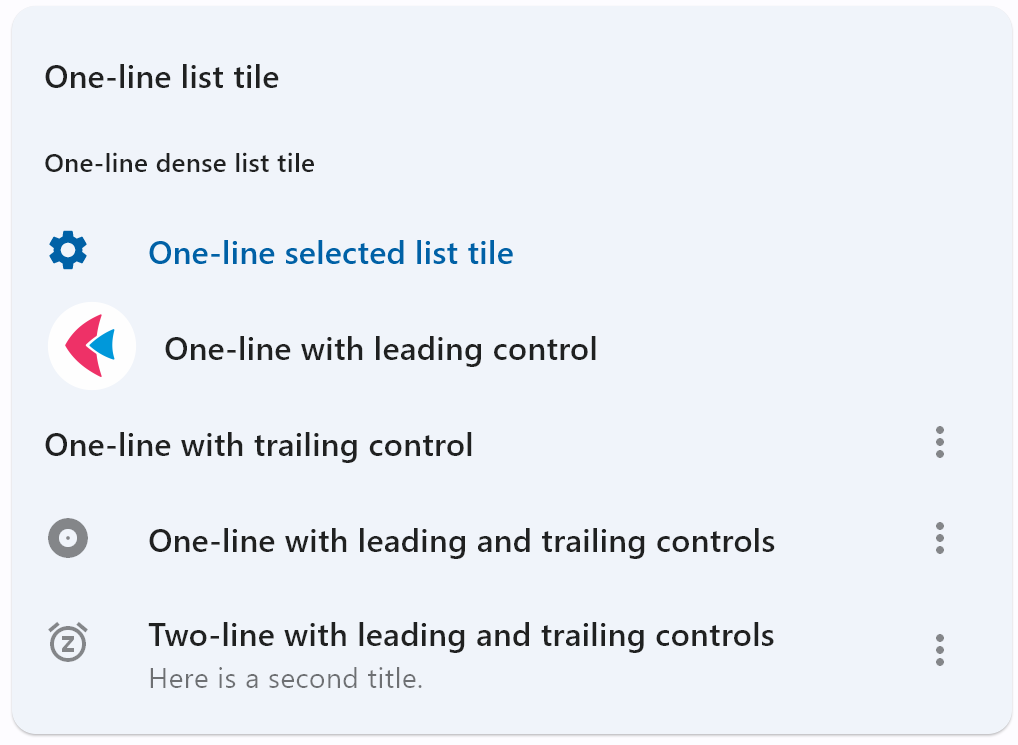
Properties
autofocusclass-attributeinstance-attribute
autofocus: bool = FalseTrue if the control will be selected as the initial focus. If there is more than one control on a page with autofocus set, then the first one added to the page will get focus.
bgcolorclass-attributeinstance-attribute
bgcolor: Optional[ColorValue] = NoneThe list tile's background color.
content_paddingclass-attributeinstance-attribute
content_padding: Optional[PaddingValue] = NoneThe tile's internal padding. It insets the contents of this tile.
: its leading, title,
subtitle, and trailing controls.
denseclass-attributeinstance-attribute
dense: Optional[bool] = NoneWhether this list tile is part of a vertically dense list.
Dense list tiles default to a smaller height.
enable_feedbackclass-attributeinstance-attribute
enable_feedback: Optional[bool] = NoneWhether detected gestures should provide acoustic and/or haptic feedback.
On Android, for example, setting this to True produce a click sound and a
long-press will produce a short vibration.
horizontal_spacingclass-attributeinstance-attribute
horizontal_spacing: Optional[Number] = NoneThe horizontal gap between the title and the leading and trailing
controls.
hover_colorclass-attributeinstance-attribute
hover_color: Optional[ColorValue] = NoneThe tile's color when hovered. Only takes effect if toggle_inputs is True or if on_click is provided.
icon_colorclass-attributeinstance-attribute
icon_color: Optional[ColorValue] = NoneDefines the default color for the icons present in leading and trailing.
is_three_lineclass-attributeinstance-attribute
is_three_line: Optional[bool] = NoneWhether this list tile is intended to display three lines of text.
If True, then subtitle must be non-null (since it is expected to give the second
and third lines of text).
If False, the list tile is treated as having one line if the subtitle is null and
treated as having two lines if the subtitle is non-null.
When using a Text control for title and subtitle, you can enforce line limits using flet.Text.max_lines.
leadingclass-attributeinstance-attribute
leading: Optional[IconDataOrControl] = NoneA control to display before the title.
leading_and_trailing_text_styleclass-attributeinstance-attribute
leading_and_trailing_text_style: Optional[TextStyle] = NoneThe TextStyle for the leading and trailing controls.
min_heightclass-attributeinstance-attribute
min_height: Optional[Number] = NoneThe minimum height allocated for this control.
If None or not set, default tile heights are 56.0, 72.0, and 88.0 for one,
two, and three lines of text respectively.
If dense is True, these
defaults are changed to 48.0, 64.0, and 76.0.
Note that, a visual density value or a large title will also adjust the default tile heights.
min_leading_widthclass-attributeinstance-attribute
min_leading_width: Optional[Number] = NoneThe minimum width allocated for the leading control.
min_vertical_paddingclass-attributeinstance-attribute
min_vertical_padding: Optional[Number] = NoneThe minimum padding on the top and bottom of the title and subtitle controls.
mouse_cursorclass-attributeinstance-attribute
mouse_cursor: Optional[MouseCursor] = NoneThe cursor to be displayed when a mouse pointer enters or is hovering over this control. The value is MouseCursor enum.
selectedclass-attributeinstance-attribute
selected: bool = FalseIf this tile is also enabled then icons and text are rendered with the same color. By default the selected color is the theme's primary color.
selected_colorclass-attributeinstance-attribute
selected_color: Optional[ColorValue] = NoneDefines the color used for icons and text when selected=True.
selected_tile_colorclass-attributeinstance-attribute
selected_tile_color: Optional[ColorValue] = NoneDefines the background color of ListTile when selected=True.
splash_colorclass-attributeinstance-attribute
splash_color: Optional[ColorValue] = NoneThe list tile's splash color after the control has been tapped.
styleclass-attributeinstance-attribute
style: Optional[ListTileStyle] = NoneDefines the font used for the title.
Defaults to ListTileStyle.LIST.
subtitleclass-attributeinstance-attribute
subtitle: Optional[StrOrControl] = NoneAdditional content displayed below the title.
If is_three_line is False, this should not wrap.
If is_three_line is True, this should be configured to take a maximum of two
lines.
For example, you can use flet.Text.max_lines to enforce the
number of lines.
Typically a Text control.
subtitle_text_styleclass-attributeinstance-attribute
subtitle_text_style: Optional[TextStyle] = NoneThe TextStyle for the subtitle control.
text_colorclass-attributeinstance-attribute
text_color: Optional[ColorValue] = NoneThe color used for texts in title, subtitle, leading, and trailing.
titleclass-attributeinstance-attribute
title: Optional[StrOrControl] = NoneA control to display as primary content of the list tile.
Typically a Text control. This should not wrap. To enforce the single line limit, use flet.Text.max_lines.
title_alignmentclass-attributeinstance-attribute
title_alignment: Optional[ListTileTitleAlignment] = NoneDefines how leading and trailing are vertically aligned relative to the titles (title and subtitle).
Defaults to ListTileTitleAlignment.THREE_LINE in Material 3 or
ListTileTitleAlignment.TITLE_HEIGHT in Material 2.
toggle_inputsclass-attributeinstance-attribute
toggle_inputs: bool = FalseWhether clicking on a list tile should toggle the state of Radio, Checkbox or Switch inside this tile.
trailingclass-attributeinstance-attribute
trailing: Optional[IconDataOrControl] = NoneA control to display after the title.
Typically an Icon control.
urlclass-attributeinstance-attribute
url: Optional[Union[str, Url]] = NoneThe URL to open when this button is clicked.
Additionally, if on_click event callback is provided, it is fired after that.
visual_densityclass-attributeinstance-attribute
visual_density: Optional[VisualDensity] = NoneDefines how compact the control's layout will be.
Events
on_clickclass-attributeinstance-attribute
on_click: Optional[ControlEventHandler[ListTile]] = NoneCalled when a user clicks or taps the list tile.
on_long_pressclass-attributeinstance-attribute
on_long_press: Optional[ControlEventHandler[ListTile]] = NoneCalled when the user long-presses on this list tile.