NavigationRail
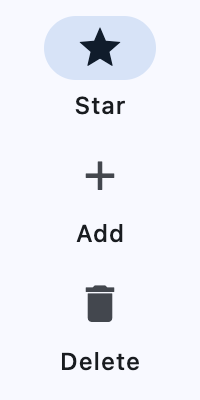
A material widget that is meant to be displayed at the left or right of an app to navigate between a small number of views, typically between three and five.
ft.NavigationRail(
    selected_index=0,
    height=200,
    width=100,
    destinations=[
        ft.NavigationRailDestination(icon=ft.Icons.STAR, label="Star"),
        ft.NavigationRailDestination(icon=ft.Icon(ft.Icons.ADD),label="Add"),
        ft.NavigationRailDestination(icon=ft.Icons.DELETE, label=ft.Text("Delete")
    ],
)
Inherits: LayoutControl
Properties
bgcolor- Sets the color of the Container that holds all of this NavigationRail's contents.destinations- Defines the appearance of the button items that are arrayed within the navigation rail.elevation- Controls the size of the shadow below the NavigationRail.extended- Indicates that the NavigationRail should be in the extended state.group_alignment- The vertical alignment for the group of destinations within the rail.indicator_color- The color of the navigation rail's indicator.indicator_shape- The shape of the navigation rail's indicator.label_type- Defines the layout and behavior of the labels for the default, unextended navigation rail.leading- An optional leading control in the rail that is placed above the destinations.min_extended_width- The final width when the animation is complete for settingextendedtoTrue.min_width- The smallest possible width for the rail regardless of the destination's icon or label size.selected_index- The index intodestinationsfor the current selectedNavigationRailDestinationorNoneif no destination is selected.selected_label_text_style- The TextStyle of a destination's label when it is selected.trailing- An optional trailing control in the rail that is placed below the destinations.unselected_label_text_style- The TextStyle of a destination's label when it is not selected.use_indicator- Whether to add a rounded navigation indicator behind the selected destination's icon.
Events
on_change- Called when selected destination changed.
Examples
Basic Example
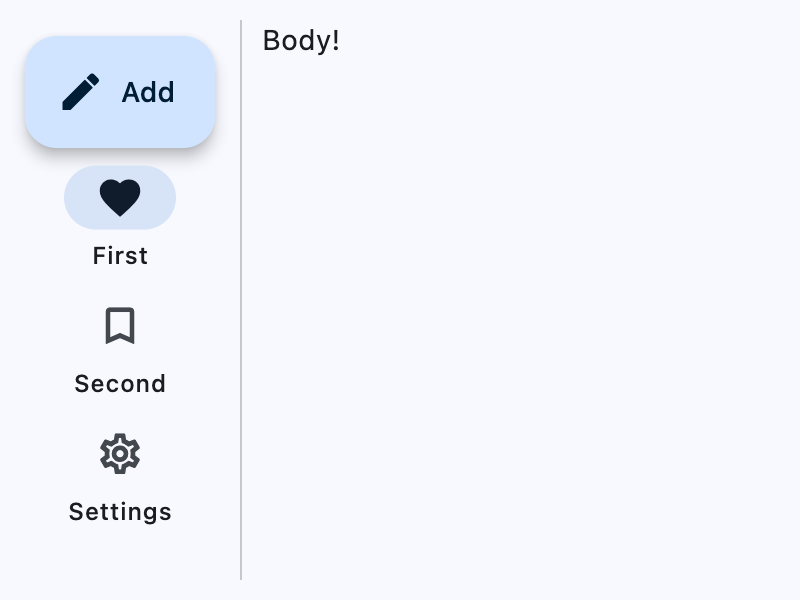
import flet as ft


def main(page: ft.Page):
    rail = ft.NavigationRail(
        selected_index=0,
        label_type=ft.NavigationRailLabelType.ALL,
        min_width=100,
        min_extended_width=400,
        group_alignment=-0.9,
        on_change=lambda e: print("Selected destination:", e.control.selected_index),
        leading=ft.FloatingActionButton(
            icon=ft.Icons.CREATE,
            content="Add",
            on_click=lambda e: print("FAB clicked!"),
        ),
        destinations=[
            ft.NavigationRailDestination(
                icon=ft.Icons.FAVORITE_BORDER,
                selected_icon=ft.Icons.FAVORITE,
                label="First",
            ),
            ft.NavigationRailDestination(
                icon=ft.Icon(ft.Icons.BOOKMARK_BORDER),
                selected_icon=ft.Icon(ft.Icons.BOOKMARK),
                label="Second",
            ),
            ft.NavigationRailDestination(
                icon=ft.Icons.SETTINGS_OUTLINED,
                selected_icon=ft.Icon(ft.Icons.SETTINGS),
                label=ft.Text("Settings"),
            ),
        ],
    )

    page.add(
        ft.SafeArea(
            expand=True,
            content=ft.Row(
                expand=True,
                controls=[
                    ft.SelectionArea(content=rail),
                    ft.VerticalDivider(width=1),
                    ft.Column(
                        alignment=ft.MainAxisAlignment.START,
                        expand=True,
                        controls=[ft.Text("Body!")],
                    ),
                ],
            ),
        )
    )


if __name__ == "__main__":
    ft.run(main)
Properties
bgcolorclass-attributeinstance-attribute
bgcolor: Optional[ColorValue] = NoneSets the color of the Container that holds all of this NavigationRail's contents.
destinationsclass-attributeinstance-attribute
destinations: list[NavigationRailDestination] = field(default_factory=list)Defines the appearance of the button items that are arrayed within the navigation rail.
The value must be a list of two or more NavigationRailDestination instances.
elevationclass-attributeinstance-attribute
elevation: Annotated[Optional[Number], V.ge(0)] = NoneControls the size of the shadow below the NavigationRail.
Defaults to 0.0.
Raises:
- ValueError - If it is not greater than or equal to
0.
extendedclass-attributeinstance-attribute
extended: bool = FalseIndicates that the NavigationRail should be in the extended state.
The extended state has a wider rail container, and the labels are positioned next to
the icons. min_extended_width can be used to set the minimum width of the rail
when it is in this state.
The rail will implicitly animate between the extended and normal state.
If the rail is going to be in the extended state, then label_type should be set to flet.NavigationRailLabelType.NONE
group_alignmentclass-attributeinstance-attribute
group_alignment: Optional[Number] = NoneThe vertical alignment for the group of destinations within the rail.
The NavigationRailDestinations are grouped together with the trailing widget, between the leading widget and the bottom of the rail.
The value must be between -1.0 and 1.0.
If group_alignment is -1.0, then the items are aligned to the top. If
group_alignment is 0.0, then the items are aligned to the center. If
group_alignment is 1.0, then the items are aligned to the bottom.
Defaults to -1.0.
indicator_colorclass-attributeinstance-attribute
indicator_color: Optional[ColorValue] = NoneThe color of the navigation rail's indicator.
indicator_shapeclass-attributeinstance-attribute
indicator_shape: Optional[OutlinedBorder] = NoneThe shape of the navigation rail's indicator.
Defaults to StadiumBorder.
label_typeclass-attributeinstance-attribute
label_type: Optional[NavigationRailLabelType] = NoneDefines the layout and behavior of the labels for the default, unextended navigation rail.
When a navigation rail is extended, the labels are always shown.
Defaults to None - no labels are shown.
leadingclass-attributeinstance-attribute
leading: Optional[Control] = NoneAn optional leading control in the rail that is placed above the destinations.
Its location is not affected by group_alignment.
Typically a FloatingActionButton, but may also be a non-button, such as a logo.
min_extended_widthclass-attributeinstance-attribute
min_extended_width: Annotated[Optional[Number], V.ge(0)] = NoneThe final width when the animation is complete for setting extended to True.
Defaults to 256.
Raises:
- ValueError - If it is not greater than or equal to
0.
min_widthclass-attributeinstance-attribute
min_width: Annotated[Optional[Number], V.ge(0)] = NoneThe smallest possible width for the rail regardless of the destination's icon or label size.
Defaults to 72.
This value also defines the min width and min height of the destinations.
To make a compact rail, set this to 56 and set
label_type to flet.NavigationRailLabelType.NONE
Raises:
- ValueError - If it is not greater than or equal to
0.
selected_indexclass-attributeinstance-attribute
selected_index: Optional[int] = NoneThe index into destinations for the current selected NavigationRailDestination or None if no destination is selected.
selected_label_text_styleclass-attributeinstance-attribute
selected_label_text_style: Optional[TextStyle] = NoneThe TextStyle of a destination's label when it is selected.
When a destination is not selected, unselected_label_text_style will instead be
used.
trailingclass-attributeinstance-attribute
trailing: Optional[Control] = NoneAn optional trailing control in the rail that is placed below the destinations.
Its location is affected by group_alignment.
This is commonly a list of additional options or destinations that is usually only
rendered when extended=True.
unselected_label_text_styleclass-attributeinstance-attribute
unselected_label_text_style: Optional[TextStyle] = NoneThe TextStyle of a destination's label when it is not selected.
When a destination is selected, selected_label_text_style will instead be used.
use_indicatorclass-attributeinstance-attribute
use_indicator: Optional[bool] = NoneWhether to add a rounded navigation indicator behind the selected destination's icon.
The indicator's shape will be circular if label_type is flet.NavigationRailLabelType.NONE, or a StadiumBorder if label_type is flet.NavigationRailLabelType.ALL or flet.NavigationRailLabelType.SELECTED.
If None, defaults to
flet.NavigationRailTheme.use_indicator.
If that is also None, defaults to flet.Theme.use_material3.
Events
on_changeclass-attributeinstance-attribute
on_change: Optional[ControlEventHandler[NavigationRail]] = NoneCalled when selected destination changed.